How to Investigate an Ethereum Address with AI
Ask an AI where an Ethereum wallet got its money and where it sent it. A step-by-step trace of one real address with the Bitquery MCP server.
An Ethereum wallet carries no name, but every payment it ever made is public. To investigate one, you find where its money came from, where it went, and which of the wallets on the other side belong to a business that knows its customers. On Ethereum that business is usually an exchange, and an exchange keeps a record of who owns each account.
The quickest way to do this today is to ask an AI that can read the chain. Connect the Bitquery MCP server to Claude, ChatGPT or Cursor. The AI then calls Bitquery's tracing and label tools for you and lists the payments behind each answer, so you can check its work.
What you need
- An AI client. Claude, ChatGPT, Cursor, VS Code and Codex can all connect. The install guide covers each one.
- A Bitquery account. The client opens a browser tab the first time it connects, and you sign in once.
- The right plan. Tracing and address labels sit on the AI Investigation MCP plan at $149 per month. The $19 Trading MCP plan has market data only. A trial comes with 100 free credits, and the pricing page has the details.
In Claude Code, adding the server is one command:
claude mcp add --transport http bitquery https://mcp.bitquery.io
Trace the money by asking an AI
Connect the Bitquery MCP server to Claude, Cursor or ChatGPT and ask in plain English where funds from a wallet went. The agent follows each hop, names the exchanges on the path, and returns the transactions behind every step.
The example address
We use 0x4775…82aa, the same wallet this guide used when it first ran in 2020. Bitquery's label database has no name for it. That makes it a fair test, because all we learn has to come from the wallets it dealt with.
Step 1: Ask who the wallet deals with
The first prompt:
Profile 0x477573f212a7bdd5f7c12889bd1ad0aa44fb82aa on Ethereum.
Who sent it money, who did it pay, and which of them are exchanges?
The AI will usually start with eth_address_flow_summary. That tool returns the transfer counts and the top wallets in each direction. It then passes those wallets to labels_for_addresses, which puts a name on each one it knows.
The counts come back first. Bitquery's index holds 715 transfers into the wallet from 108 addresses, and 424 out to 78. Its first transfer was on 1 September 2020 and its last outgoing one on 27 December 2022. Most of the action came in the last four months of 2020, which hold 362 of the outgoing transfers.
Step 2: Put names on the other side
The labels turn a list of hex strings into a story. Here is what Bitquery's data shows for the labeled wallets, with amounts in token units.
Money in, from exchange wallets
- Bittrex, one hot wallet: 65,253 ETH
- Binance, four hot wallets: 32,524 ETH, 17.8M USDC, 7.7M USDT, 8.9M FTT, 5.7M SUSHI and 3M UNI
- Bitfinex, one hot wallet listed in its proof of reserves: 11.4M FTT
- FTX, two hot wallets: 4,014 ETH, 8.8M SUSHI, 5.5M USDT, 0.5M USDC and 0.5M UNI
- OKX, Coinone and HTX hot wallets: 1.4M SRM, 330,000 SRM and 7 YFI
- A GOPAX wallet: 270,000 FTT
Money through Cream Finance, a lending protocol
- 182,793 ETH in and 180,880 ETH paid back as internal transfers
- 26.4M FTT in and 26.3M back
- 13.6M USDC and 13.6M USDT in, with 13.6M USDC and 13.5M USDT back
Money out, to exchange deposit addresses
- Binance, three addresses: 60,882 ETH, 14.6M FTT, 10M USDT, 6.2M SUSHI, 3.2M UNI and 3.1M USDC
- Bittrex, one address: 28,640 ETH
- HTX (Huobi at the time), two addresses: 19,000 ETH, 3.9M USDT and 300,000 SUSHI
- OKX, Gate.io and Poloniex, one address each: 135,675 CRO at OKX, and 2,000 and 4,000 CREAM at the other two
The two kinds of exchange wallet mean different things. A hot wallet is the shared wallet an exchange pays out from, so a transfer from one is a customer withdrawing to this address. A deposit address belongs to a single customer account, so a transfer to one is a deposit into that account. Both leave a record at the exchange that ties the address to an account holder. That record is the lead a court or the police can ask for.
Step 3: Check the labels you rely on
A label is a claim. All nine deposit tags here came from a rule that spots a sweep pattern, so we tested each one with a further prompt:
Where does 0x94e509b0f855297c0b99ab61bff027e0ad114121 send what it receives?
A real deposit address passes nearly all it gets on to its exchange. This one made 8,535 outgoing transfers, and 8,518 of them went to Binance hot wallets. The other eight passed too: each sent at least 99% of its outgoing transfers to hot wallets of the exchange its label names. All nine tags hold.
Ask the AI for the source behind each label too. A tag whose source name contains "heuristic" was guessed from payment patterns. Tags from sanctions lists or an exchange's published proof of reserves are stronger. On this trace the SushiSwap router also carries a SwissBorg deposit tag from a pattern rule, while three other sources agree it is a router. Trust the sources that agree.
Step 4: Watch for gaps and junk
- Ask for internal transfers. When Cream paid ETH back, contract code sent it from inside the transaction. Tracing tools can leave these internal transfers out, so ask the AI to include them, or the 180,880 ETH that came back from Cream will be missing.
- Skip the spam. Since July 2022 the wallet has received 18 transfers, and 15 of them are tokens named after a website, most promising rewards. The name is the bait. Do not visit those sites.
- Count in tokens. The tracing tools return amounts in tokens and never add two tokens together. If you need a dollar figure, ask for the price at the date of each transfer.
What the trace found
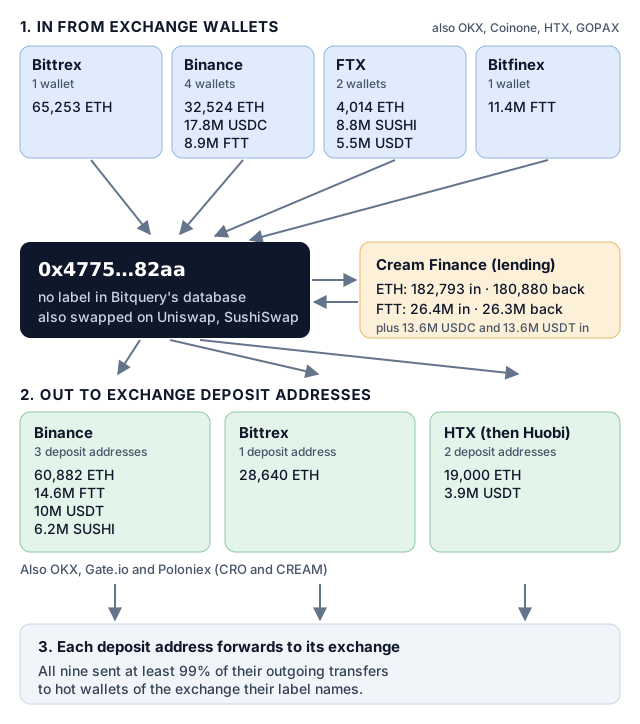
Coins came in from the wallets of eight exchanges, went through Cream Finance, Uniswap and SushiSwap, and went out to deposit addresses at six. Nothing on the chain names the owner. But ten exchanges kept account records tied to this wallet: the accounts that withdrew to it and the accounts behind the deposits it made.
The trace is not finished. Some of the biggest counterparties carry no label at all. 0x554c…0359 took 40,370 ETH and 0x3e8e…0425 took 26.5M USDC, and both are busy wallets that have sent thousands of transfers. On the way in, 0x9713…a5c1 sent 35,000 ETH. Those three are the next wallets to profile, and in the AI client that is one more prompt.
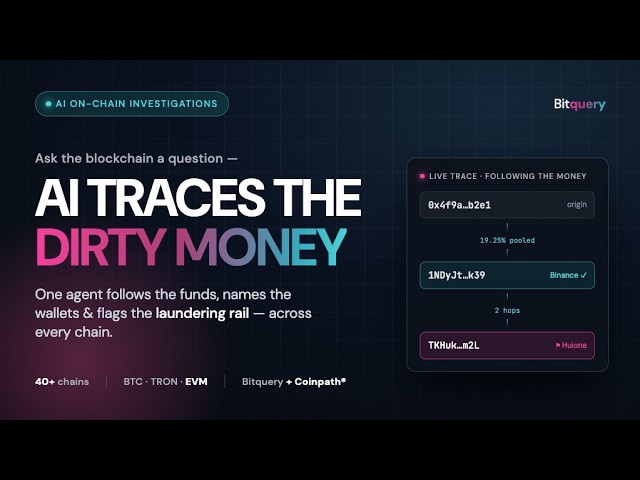
To run a whole trace in one go, the server ships guided prompts. address_report builds a full profile of one wallet, money_flow follows funds across several steps and stops at exchanges, and risk_screen returns a low, medium or high risk verdict with the evidence behind it. This video shows a full investigation of a Tron wallet inside Claude:
Without an AI
Developers can query the same data directly. Transfers come from the EVM transfers API, and names from the Address Labels API. For a longer method, see our guide to tracing Bitcoin transactions and addresses, and for training, our list of crypto investigation courses.
How we made this page
The figures come from Bitquery's Ethereum transfer index and label database, queried on 5 October 2026. We counted each successful transfer once, left out internal transfers unless the text says otherwise, and checked each deposit label against where those coins went next. The text was drafted with Claude, an AI model, from those query results. This guide first ran in October 2020 as a walk-through of the Bitquery explorer and was rewritten in October 2026 around the MCP server.
Subscribe to our newsletter
Subscribe and never miss any updates related to our APIs, new developments & latest news etc. Our newsletter is sent once a week on Monday.